


Paid Traffic

Landing Pages

If you run ads on Facebook, Google, YouTube or anywhere else, send people to a page on your own website first, and let that page send them on to the presentation. Here are two ready-made pages you can put up today.

An affiliate setting up a presell page on her laptop
Two ready-made pagesHTML or WordPress

How to use this page

  1. 1
    Pick a templateTwo ready-made presell pages to choose from.
  2. 2
    DownloadPlain HTML or the WordPress import.
  3. 3
    Add your hoplinkThen point your ads at your own page.

Why send ad traffic to your own page?

Facebook, Google and the other ad networks don’t like lots of affiliates sending ads straight to the same website. When you send people to a page on your own website first, you avoid that problem.

Your own page also lets you warm people up with a story before they watch, test your own headlines, and build your own ad audiences from the people who visit.

Each template comes two ways

  • Plain HTML: one page plus a pictures folder. Upload it to any web host. A README explains every step, including how to change the words with an AI assistant.
  • WordPress: an import file for our free Commission Kickstart plugin, pictures included.

You have not created a promotion hoplink, click here to create one.

Create my hoplink

The live previews use your saved hoplink, so you can click through and check where the buttons go. In the downloads, every button says AFFILIATE-LINK until you put your own hoplink in.

Choose a template

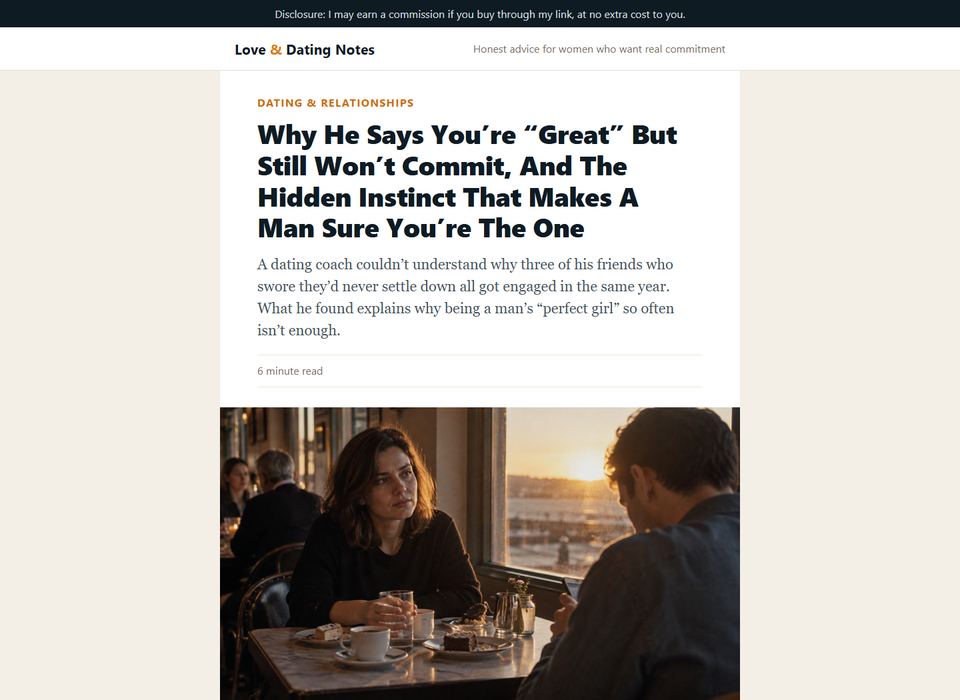
Article presell on a computer Article presell on a phone

Article presell

Live preview

A warm, story-led article about why a man says a woman is “great” but still won’t commit, and the instinct that makes him sure. It warms readers up and sends them to the free presentation. Best for Facebook and native ads.

  • About 1,500 words, with 5 photos and the product picture
  • Two buttons, in the middle and at the end
  • Disclosure line at the top and results-vary note at the bottom

Bridge page on a computer Bridge page on a phone

Bridge page

Live preview

A short page with a headline, a photo, five bullets from the presentation and a big “Watch the free presentation” button. Visitors read it in under a minute. Best for search ads and YouTube.

  • Headline, photo and five bullets
  • Two buttons, and a short “every stage of a relationship” strip
  • Disclosure line at the top and results-vary note at the bottom

How to put your page up

Plain HTML version

  1. 1

    Download the HTML zip and unzip it. You get index.html, an images folder and a README.

  2. 2

    Open index.html in a text editor and use Find and Replace to change every AFFILIATE-LINK to your hoplink: https://hop.clickbank.net/?affiliate=YOURID&vendor=claytonmax

  3. 3

    Upload index.html and the images folder to a folder on your website, for example with your host’s File Manager or by FTP.

  4. 4

    Open the page, click a button to check it goes to the presentation, then point your ads at it.

WordPress (Commission Kickstart) version

  1. 1

    Get the free plugin from Commission Kickstart and install it on your WordPress site.

  2. 2

    Add a new page, click Enable in the Commission Kickstart box, and import the zip you downloaded. The pictures come in with it.

  3. 3

    Put your hoplink into every button link field in place of AFFILIATE-LINK.

  4. 4

    Publish the page, check the buttons, and start running traffic to it.

If you change the words, keep every claim inside what the Infatuation Scripts sales page says. Don’t promise he’ll commit, propose or come back, don’t add results or testimonials, and keep the disclosure line (“I may earn a commission if you buy through my link”) on the page.